By using this site, you agree to the Privacy Policy and Terms of Use.
Accept
Techticia.comTechticia.comTechticia.com
  • Home
  • Recent
  • Jobs
  • Categories
    • AI
    • Amazon
    • Android
    • Apple
    • Apps
    • Crypto
    • Enterprise
    • Entertainment
    • EVs
    • Fintech
    • Gadget
    • Gadgets
    • Gaming
    • Google
    • Hardware
    • Meta
    • Microsoft
    • Mobile
    • Privacy
    • Security
    • Socials
    • SpaceX
  • Pages
    • Privacy Policy
    • About Us
    • Contact Us
    • Terms and Conditions
Search
Emerging Tech
  • Biotech & Health
  • Drones
  • Robotics
  • Space
  • Wearables
  • Tech News
  • Technology
Business & Policy
  • Commerce
  • Fundraising
  • Government & Policy
  • Policy & Regulations
  • Venture
  • Startups
Mobility & Culture
  • Climate
  • Entertainment
  • EVs
  • Media & Entertainment
  • Robotaxis
  • Transportation
  • Contact
  • Blog
  • Complaint
  • Advertise
© 2026 Techticia.com. All Rights Reserved.
Reading: iPhone Duo Split View: Why It’s Fixed at 50/50
Share
Sign In
Notification Show More
Font ResizerAa
Techticia.comTechticia.com
Font ResizerAa
  • Tech News
  • Gadget
  • Technology
  • Mobile
Search
  • Home
  • Recent
  • Jobs
  • Categories
    • AI
    • Amazon
    • Android
    • Apple
    • Apps
    • Crypto
    • Enterprise
    • Entertainment
    • EVs
    • Fintech
    • Gadget
    • Gadgets
    • Gaming
    • Google
    • Hardware
    • Meta
    • Microsoft
    • Mobile
    • Privacy
    • Security
    • Socials
    • SpaceX
  • Pages
    • Privacy Policy
    • About Us
    • Contact Us
    • Terms and Conditions
Have an existing account? Sign In
Follow US
  • Contact
  • Blog
  • Complaint
  • Advertise
© 2026 Techticia.com. All Rights Reserved.
Techticia.com > Blogs > Apple > iPhone Duo Split View: Why It’s Fixed at 50/50
AppleGadgets

iPhone Duo Split View: Why It’s Fixed at 50/50

Matilda Lucia, Techticia.com author avatar
Last updated: September 12, 2026 4:42 am
Matilda
Share
SHARE

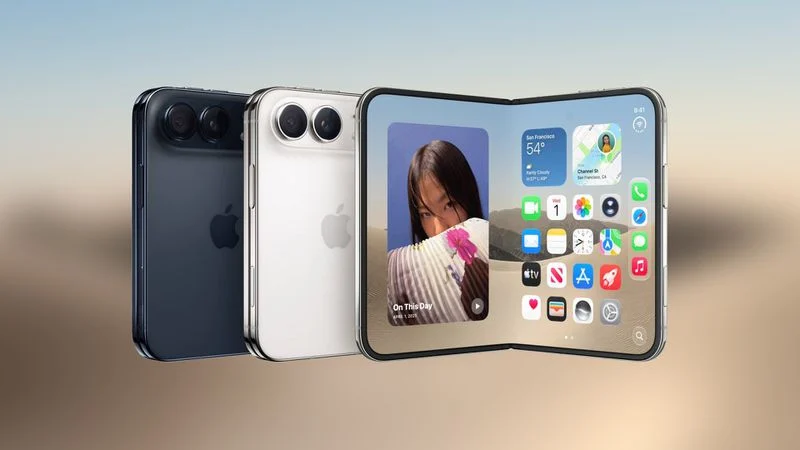
The iPhone Duo Split View is here, but it does not work quite like the Split View you may know from iPad. Apple’s first foldable iPhone can run two apps side by side, yet anyone expecting the same freedom iPad users enjoy will want to temper their expectations.

Contents
  • How the iPhone Duo Split View Actually Works
    • Why the Split Is Locked at 50/50
    • What You Can Still Do
  • iPhone Duo Split View vs iPad Split View
  • What This Means for Buyers

Apple’s marketing materials for the iPhone Duo talk up app pairs and side-by-side windows, but they do not mention resizing them. There is a reason for that omission.

How the iPhone Duo Split View Actually Works

If you put two apps side by side on the iPhone Duo’s 7.6-inch foldable display, you cannot drag the divider between them to give one app more space than the other. It is a fixed 50/50 split, regardless of what you are doing.

That is likely to disappoint anyone who has used Split View on an iPad. iPad owners have been able to resize apps in Split View when in landscape mode ever since 2015, when iOS 9 introduced the feature.

So why does Apple not let you resize apps on the iPhone Duo? The answer likely comes down to the device’s display geometry.

Why the Split Is Locked at 50/50

Both the inner and outer displays share the same 1:1.4 aspect ratio. Each half of the inner display works out to roughly the same size and shape as the outer screen.

An even split gives each app a canvas it already has to support, with the divider sitting neatly on the fold. If you could drag the boundary around, it would create a range of in-between sizes that would not fit neatly on the outer screen. It would also be a nightmare for developers to build support into their iPhone apps.

What You Can Still Do

Despite the lack of resizing capability, the iPhone Duo’s foldable screen still offers plenty of benefits. It allows you to:

  • Quickly swap between apps

  • Open two windows of the same app

  • Have a conversation over Messages while looking at another app’s content on the other side of the screen, in both landscape and portrait modes

  • Save pairs of apps to come back to later

For many users, that flexibility may be enough. The fixed divider keeps things simple and predictable.

iPhone Duo Split View vs iPad Split View

The comparison to iPad is natural, but the two experiences serve different purposes. iPad Split View was built for a larger tablet canvas where resizing makes sense. The iPhone Duo Split View is built around a foldable phone that must also work as a standard handheld device.

FeatureiPhone DuoiPad
Side-by-side appsYesYes
Resizable dividerNoYes (landscape)
Fixed 50/50 splitYesNo
Foldable displayYesNo

The iPad has had resizable Split View since iOS 9 in 2015. The iPhone Duo takes a different approach because of its unique hardware.

What This Means for Buyers

Apple’s first iPhone with a foldable display was always going to have a learning curve, especially for users coming from the iPad. The fixed split is one of those adjustments.

With a starting price of $1,999, the iPhone Duo is a premium device. Pre-orders begin Friday, October 16, with availability starting Friday, October 23.

If you are considering the iPhone Duo, go in knowing that the iPhone Duo Split View is intentionally simple. It is not a replacement for iPad multitasking. It is a new way to use two apps on a phone that folds open into a small tablet-like display.

The iPhone Duo Split View gives you two apps side by side, but it does not give you control over how much space each one takes. That is a deliberate design choice tied to the display’s geometry and the need to keep app development manageable.

For some users, the simplicity will be a welcome change from the fussiness of iPad multitasking. For others, the lack of resizing will feel like a limitation. Either way, the iPhone Duo marks a new chapter for iPhone multitasking, and the Split View experience is just one part of that story.


Anker PowerIQ: What the IQ on Your Charger Really Means
Apple Sued for Face ID Patent Infringement
Apple Job Cuts Hit Siri and Vision Pro Teams
ChatGPT Apple Messages Plugin: Send Texts via AI
Google Home MCP: Control Smart Devices With AI Agents

Sign Up for Our Daily Newsletter

Get the latest breaking news and updates delivered straight to your inbox.
By signing up, you agree to our Terms and Conditions and acknowledge the data practices in our Privacy Policy. You may unsubscribe at any time.
Share This Article
Facebook Copy Link Print
Share
Matilda Lucia, Techticia.com author avatar
ByMatilda
Follow:
At Techticia.com, I cover technology, gadgets, AI, product reviews and practical consumer tips, helping readers follow the tools and trends shaping the digital world.
Previous Article Google Signs Biggest Rice Methane Carbon Credit Deal Google Signs Biggest Rice Methane Carbon Credit Deal
Next Article Venture Capital Sports Ownership: Thrive Capital and Collaborative Fund Venture Capital Sports Ownership: Thrive Capital and Collaborative Fund
Leave a Comment

Leave a Reply Cancel reply

Your email address will not be published. Required fields are marked *

Stay Connected

FacebookLike
XFollow
InstagramFollow
YoutubeSubscribe
WhatsAppFollow
LinkedInFollow
ThreadsFollow
BlueskyFollow
banner banner
Find your people. Find your next chapter.
Connect, explore jobs, and share what you love.
Get Semasocial

Latest News

Halide iPhone Duo Update Brings Foldable Camera Features
Apple Gadgets
Qwen Model Upload: Cohere's Alibaba Test Explained
Qwen Model Upload: Cohere’s Alibaba Test Explained
AI
Win Enterprise Customers: Secrets From Databricks Co-Founder
Startups
Apple Adds More Siri AI Tools in 27.2 Updates
AI Apple

You Might also Like

iPhone Duo Startup Screen Adds Your Name at Apple Stores
AppleGadgets

iPhone Duo Startup Screen Adds Your Name at Apple Stores

Matilda Lucia, Techticia.com author avatar
Matilda
7 Min Read

Spotify Family Plan QR Code Could Cost You Premium Access

Matilda Lucia, Techticia.com author avatar
Matilda
6 Min Read
Apple Health App Now Calculates Your Health Age & Readiness
AIAppleApps

Apple Health App Now Calculates Your Health Age & Readiness

Matilda Lucia, Techticia.com author avatar
Matilda
5 Min Read
//

Craving the latest tech news? Techticia delivers! Dive deep into insightful articles on everything from cutting-edge gadgets and AI advancements to reviews, consumer tips, and future tech trends. Techticia.com keeps you informed and connected to the ever-evolving world of technology.

Sign Up for Our Newsletter

Subscribe to our newsletter to get our newest articles instantly!

Techticia.comTechticia.com
Follow US
© 2026 Techticia.com. All Rights Reserved.
Stay Ahead with Techticia
Get the latest technology news, reviews, guides, and updates from Techticia delivered to your inbox.
By subscribing, you agree to our Privacy Policy. Unsubscribe at any time.
Welcome Back!

Sign in to your account

Username or Email Address
Password

Lost your password?