
Apple this week unveiled its new iPhone lineup, including the first ever foldable iPhone – the iPhone Duo. The iPhone Duo split screen experience has quickly become one of the most talked-about features of the device, and for good reason. While the Duo itself is a fantastic device, it does leave me wishing that Apple had done better for the iPad.
Ever since the release of iPadOS 26 last year, I’ve missed the earlier days of iPad multitasking. Sure, windowing is cool – but I don’t want that all the time. With iPadOS 26, you’re either all in on windowing, or you can only use apps in full screen. Apple did re-introduce split screen and Slide Over in later versions, but the features still require you to utilize the windowing system.
How iPhone Duo Split Screen Actually Works
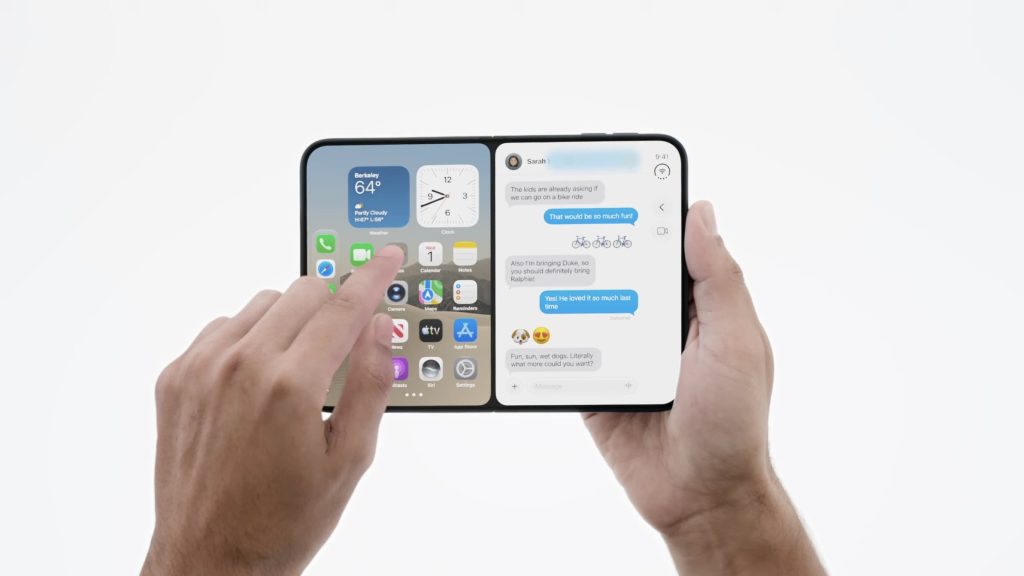
With iPhone Duo, multitasking feels much more elegant. You can put an app into half of a split screen, whilst still seeing your full home screen to select another app. You can also save apps as a pair for swapping into later. This approach keeps the simplicity of choosing apps front and center, rather than burying the process inside a window management layer.
The iPhone Duo split screen also offers something no iPad offers: the ability to split screen a video with an app. On iPad mini, which is very similarly sized to iPhone Duo, this could be excellent. Watching a video while browsing or taking notes is a genuinely useful combination, and it’s surprising that the iPad hasn’t delivered the same flexibility.
A Simpler Path to Multitasking
What makes the iPhone Duo split screen stand out is how naturally it fits into how people actually use their phones. You don’t need a keyboard, a trackpad, or a menu full of window controls. You just pick two apps and go. The system remembers pairs you’ve saved, so returning to a familiar combination takes seconds.
That level of convenience is exactly what’s missing on the iPad. The iPhone Duo shows that Apple already knows how to build a streamlined multitasking system. The question is why that same system hasn’t made its way to the tablet.
iPadOS 27 Still Takes an All-or-Nothing Approach
And yet, iPadOS 27 still takes an all or nothing approach to multitasking. Even on the iPad mini, where windowing is far too convoluted, users are stuck with the same rigid structure. You either commit fully to the windowing workflow or you stay in full screen. There’s no middle ground that matches the iPhone Duo split screen’s flexibility.
The iPad mini is a particularly frustrating example. Its size is close to that of the iPhone Duo, so you’d expect a similar multitasking experience. Instead, the smaller screen makes the windowing system feel even more cramped and harder to manage. The simplicity that makes the iPhone Duo split screen work so well is nowhere to be found.
Why Windowing Isn’t the Problem
To be clear, I’m not saying we should take away windowing. Windowing has its place, especially for people who use an iPad with a Magic Keyboard and want a more desktop-like experience. The issue isn’t that windowing exists – it’s that it’s the only real option.
If Apple has already engineered a simpler multitasking system for the iPhone Duo, why not bring it to the iPad? At its core, iPadOS is still iOS, and while not everything can automatically scale to the iPad, it shouldn’t be a massive undertaking. The building blocks are clearly there.
What iPhone Duo Split Screen Means for the Future
Personally, I’m incredibly excited for the iPhone Duo. Apple nailed the software implementation in a manner that nobody was really thinking about, but in hindsight it’s such an obvious direction for the future of foldables. The iPhone Duo split screen feels like the beginning of a broader shift in how Apple approaches multitasking across its devices.
I just wish Apple didn’t make iPad multitasking borderline hostile towards those of us who aren’t using a Magic Keyboard. Not everyone wants to attach a keyboard to their tablet. Many people simply want to run two apps side by side, quickly and without friction. The iPhone Duo split screen proves that’s possible.
The Case for Consistency Across Devices
Apple has a real opportunity here. The iPhone Duo split screen demonstrates that a simpler, more intuitive multitasking model can coexist with more advanced options. Bringing that same approach to the iPad wouldn’t require abandoning windowing – it would simply give users a choice.
For iPad mini owners in particular, an iPhone Duo split screen-style mode could transform the device. The iPad mini is portable, powerful, and well-suited to quick two-app workflows. Right now, its software holds it back.
A Vision the iPad Should Follow
iPhone Duo offers a vision for how nice multitasking could be on the iPad. The saved app pairs, the video-plus-app combination, and the ability to pick a second app without leaving your home screen all add up to a system that feels designed for real people.
None of this is revolutionary technology. It’s thoughtful design. And that’s exactly why it’s frustrating that the iPad still doesn’t offer it. Apple has already solved the problem on one device. Extending that solution to another seems like the logical next step.
What I’d Like to See Next
Looking ahead, I’d love to see Apple bring the iPhone Duo split screen philosophy to iPadOS in a future update. That could mean a dedicated split screen mode that doesn’t require entering the windowing system at all. It could also mean bringing saved app pairs and video split screen to the iPad.
The iPad is capable hardware. The iPad mini, the iPad Air, and the iPad Pro all have the power to run two apps side by side smoothly. The limitation is software, not silicon. If Apple can ship the iPhone Duo split screen experience on a foldable phone, the iPad should be able to match it.
Final Thoughts on iPhone Duo Split Screen
The iPhone Duo split screen is a genuine highlight of Apple’s new foldable. It’s elegant, fast, and refreshingly simple. It also shines a light on how convoluted iPad multitasking has become, especially on smaller models like the iPad mini.
Apple nailed the software implementation on the iPhone Duo in a way that few expected. Now the ball is in Apple’s court to bring that same clarity to the iPad. Until then, iPad users who don’t want a Magic Keyboard will keep waiting for a multitasking experience that finally feels as good as the iPhone Duo split screen.