
By using this site, you agree to the Privacy Policy and Terms of Use.
Accept
Techticia.comTechticia.comTechticia.com
  • Home
  • Recent
  • Jobs
  • Categories
    • News
    • AI
    • Apple
    • Gadgets
    • Startups
    • Wearables
  • Pages
    • Privacy Policy
    • About Us
    • Contact Us
    • Terms and Conditions
Search
Emerging Tech
  • Wearables
Business & Policy
  • Startups
Mobility & Culture
  • Contact
  • Blog
  • Privacy Policy
  • Terms of Use
© 2026 Techticia.com. All Rights Reserved.
Reading: Gemini Google Maps: Chat With AI in CarPlay
Share
Sign In
Notification Show More
Font ResizerAa
Techticia.comTechticia.com
Font ResizerAa
Search
  • Home
  • Recent
  • Jobs
  • Categories
    • News
    • AI
    • Apple
    • Gadgets
    • Startups
    • Wearables
  • Pages
    • Privacy Policy
    • About Us
    • Contact Us
    • Terms and Conditions
Have an existing account? Sign In
Follow US
  • Contact
  • Blog
  • Privacy Policy
  • Terms of Use
© 2026 Techticia.com. All Rights Reserved.
Techticia.com > Blogs > News > Gemini Google Maps: Chat With AI in CarPlay
News

Gemini Google Maps: Chat With AI in CarPlay

Matilda Lucia, Techticia.com author avatar
Last updated: October 22, 2026 7:39 am
Matilda
Share
Gemini Google Maps: Chat With AI in CarPlay
SHARE

Gemini Google Maps Arrives in CarPlay

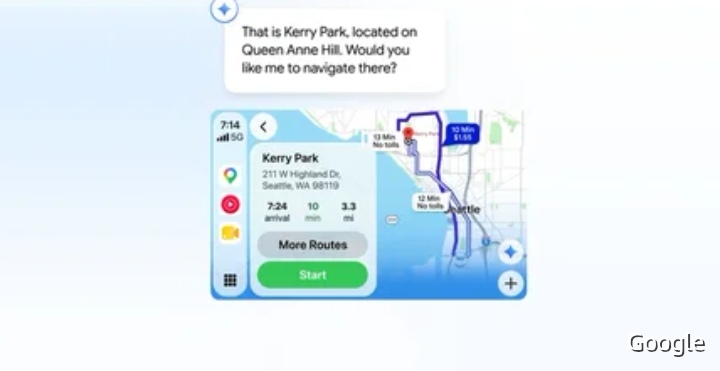
Gemini Google Maps is here for CarPlay users. Google has begun rolling out a small but meaningful update for the iOS version of Maps, and it brings the company’s conversational driving experience directly into your car’s dashboard. If you’re one of the many CarPlay users who prefers Google Maps for navigation, you can now chat with Gemini without picking up your phone.

With Maps open on your CarPlay display, you’ll see a new Gemini icon toward the bottom right of the interface. Just tap the button to start asking questions of the company’s chatbot. The setup is simple, and there’s nothing extra to install beyond the updated Maps app.

How Gemini in Navigation Works

According to Google, Gemini offers “a conversational way to find stops on-the-go, report traffic disruptions, get information about places, and more.” That means you can speak naturally rather than tapping through menus or typing searches while you drive.

Google adds that Gemini is particularly adept at answering multi-part questions — for example, “what park is famous for gorgeous views overlooking the city?” Instead of breaking that into several separate searches, you can ask it in one go and get a single, useful answer.

Built for Drivers on the Move

The appeal of Gemini Google Maps integration is that it keeps your hands and attention where they belong. Finding a stop, checking on traffic disruptions, or learning about a place along your route becomes a conversation rather than a distraction. For anyone who spends a lot of time in the car, that’s a practical improvement to the daily drive.

Rollout Details

Gemini in navigation is starting to roll out to CarPlay users in the US and throughout the world. As always, it may take a few days before the update arrives on your device, so be patient if you don’t see it right away. If the icon isn’t there yet, keep your Maps app updated and check again over the following days.

What Else Google Announced

The CarPlay update arrives after Google announced it was beginning to roll out Gemini Personal Intelligence to Android Auto users the day before. When enabled, the feature allows the chatbot to pull information from your other Google apps to personalize its responses.

In practice, Google says Personal Intelligence improves Gemini’s reasoning capabilities and makes the assistant capable of delivering more specific details as they relate to your questions and prompts. Together with the CarPlay rollout, it shows Google is pushing its conversational assistant deeper into the driving experience across both major phone platforms.

Why This Update Matters

CarPlay has long been a way to access navigation, messages, music, and other apps through your car’s infotainment system, with simplified controls on a larger display. Adding a conversational assistant to that mix changes how you interact with navigation. Instead of searching for a gas station or a restaurant through a series of taps, you can simply ask.

For Google Maps users specifically, the update keeps them inside the app they already prefer rather than switching between services. The Gemini icon sits right on the navigation screen, so there’s no need to leave the map view to get an answer.

Tips for Getting Started

· Make sure the iOS version of Google Maps is updated to the latest release.

· Open Maps through CarPlay and look for the Gemini icon in the bottom right corner.

· Tap the icon and ask a question the way you would in a normal conversation.

· Try multi-part questions to get more useful answers in a single response.

· If the icon doesn’t appear immediately, wait a few days and check again as the rollout continues.

Gemini Google Maps brings a conversational assistant to one of the most-used navigation apps on CarPlay. Whether you want to find a stop on the go, report a traffic disruption, or learn more about a place ahead, the new Gemini icon puts those answers a tap away. The feature is rolling out now to CarPlay users in the US and worldwide, so keep an eye on the bottom right of your Maps interface.


 

Pinterest Beauty Guides: AI Turns Pins Into Salon Plans
Apple Pay India Launch: Axis Bank Leads First Rollout
AI Branding Problem: Why Gemini and Rivals Confuse Users
Uber Zipline Drone Delivery: 1M Daily Eats by 2029
Circular Ring 3: Contactless Payments & Vibration Alerts

Sign Up for Our Daily Newsletter

Get the latest breaking news and updates delivered straight to your inbox.
By signing up, you agree to our Terms and Conditions and acknowledge the data practices in our Privacy Policy. You may unsubscribe at any time.
Share This Article
Facebook Copy Link Print
Share
Matilda Lucia, Techticia.com author avatar
ByMatilda
Follow:
At Techticia.com, I cover technology, gadgets, AI, product reviews and practical consumer tips, helping readers follow the tools and trends shaping the digital world.
Previous Article Bluesound Apple Music Support Arrives in Free BluOS Update Bluesound Apple Music Support Arrives in Free BluOS Update
Next Article Apple Music Logo: New Ripples in Water Design Apple Music Logo: New Ripples in Water Design
Leave a Comment

Leave a Reply Cancel reply

You must be logged in to post a comment.

Stay Connected

FacebookLike
XFollow
InstagramFollow
YoutubeSubscribe
WhatsAppFollow
LinkedInFollow
ThreadsFollow
BlueskyFollow

 banner							
 banner
Find your people. Find your next chapter.
Connect, explore jobs, and share what you love.
Get Semasocial

Latest News

Backglow MacBook App: Control the Glowing Apple Logo
Apple Gadgets
Sync Apple Music Across Devices: Easy Setup Guide
Apple Apps
Halide iPhone Duo Update Brings Foldable Camera Features
Apple Gadgets
Qwen Model Upload: Cohere's Alibaba Test Explained
Qwen Model Upload: Cohere’s Alibaba Test Explained
AI

You Might also Like

AI Startups Fund: Google Alumni Raise $11.3M for Enterprises
NewsStartups

AI Startups Fund: Google Alumni Raise $11.3M for Enterprises

Matilda Lucia, Techticia.com author avatar
Matilda
6 Min Read

Oura Ultrahuman Lawsuit: Oura Sues Over Ring Pro

Matilda Lucia, Techticia.com author avatar
Matilda
5 Min Read
Nvidia MediaTek AI Chip Strategy for Big Tech
News

Nvidia MediaTek AI Chip Strategy for Big Tech

Matilda Lucia, Techticia.com author avatar
Matilda
9 Min Read
//

Craving the latest tech news? Techticia delivers! Dive deep into insightful articles on everything from cutting-edge gadgets and AI advancements to reviews, consumer tips, and future tech trends. Techticia.com keeps you informed and connected to the ever-evolving world of technology.

Sign Up for Our Newsletter

Subscribe to our newsletter to get our newest articles instantly!

Techticia.comTechticia.com
Follow US
© 2026 Techticia.com. All Rights Reserved.
Stay Ahead with Techticia
Get the latest technology news, reviews, guides, and updates from Techticia delivered to your inbox.
By subscribing, you agree to our Privacy Policy. Unsubscribe at any time.
Welcome Back!

Sign in to your account

Username or Email Address
Password

Lost your password?