Google’s Answer to Canva: Creating with Prompts Instead of Design
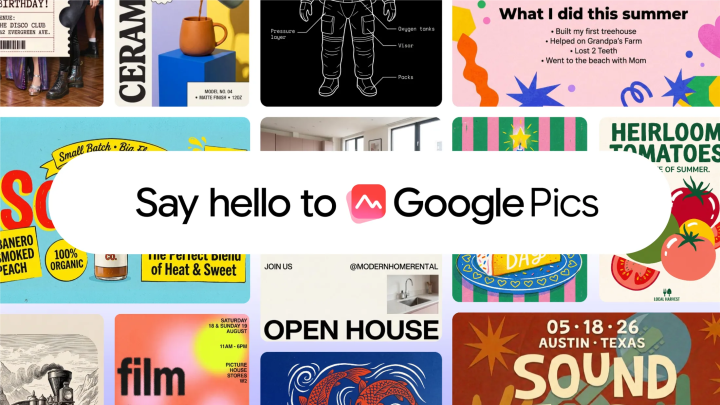
Google has officially entered the creative design market with a new AI-powered image tool called Google Pics. Announced on September 1, 2026, this tool is set to become a core part of the Google Workspace suite for business customers and premium Google AI subscribers. Rather than relying on traditional drag-and-drop design, the Google Pics AI tool allows users to create visuals simply by using text prompts.
Powered by Google’s advanced Nano Banana image-generation model, the Google Pics AI tool is designed to handle everyday design tasks. Whether you need a poster for a company event or social media graphics for a campaign, this tool aims to simplify the creative process for professionals and casual users alike. The rollout will occur over the coming weeks, targeting most Workspace customers and those who pay for Google AI Pro or Ultra.
How the Google Pics AI Tool Compares to Canva and Adobe
While the Google Pics AI tool is a direct competitor to popular design platforms like Canva and Adobe Express, its approach is fundamentally different. Canva operates as a massive marketplace where artists, illustrators, and photographers publish templates, graphics, and photos to earn royalties. Users of Canva often rely on these pre-existing assets to build their projects.
The Google Pics AI tool, however, takes a different route. It focuses on generating unique content from scratch based on user prompts. This means you are not searching through a library of existing images but rather describing what you want to see. Instead of designing something new from scratch like you would in Adobe Express, you prompt the AI to create it for you. This shift from manual design to AI generation represents a significant change in how work gets done, though it raises questions about the use of training data.
Key Features of the Google Pics AI Tool
The functionality of the Google Pics AI tool extends beyond simple text-to-image generation. It includes robust editing capabilities that give users control over the final output. For instance, users can isolate and transform specific objects within an image, modify or translate text that appears inside pictures, and make other precise adjustments.
Collaboration is also a key focus. The Google Pics AI tool supports collaborative editing, allowing teams to work on designs together in real-time. Additionally, it provides the ability to generate several different versions of an image, letting users pick the best one from a set of options. This ensures that while the tool is AI-driven, the user remains in control of the creative direction.
Editing Capabilities Beyond Generation
The Google Pics AI tool is not just about creating images from scratch. It also offers practical editing features that address common design pain points. Users can isolate objects within an image to move, resize, or transform them independently. This is particularly useful for adjusting layouts or repurposing visual elements for different formats.
Another standout feature is the ability to modify or translate text that appears inside images. This means you can generate an image with text and then edit that text directly within the tool, saving time and eliminating the need for external software. These editing capabilities make the Google Pics AI tool a comprehensive solution for both creation and refinement.
Multiple Generations for Better Results
One of the most practical features of the Google Pics AI tool is its ability to produce several different generations of the image you have requested. Instead of receiving a single output, you get a selection of variations. This allows you to compare options and pick the best one for your needs.
This iterative approach is particularly valuable for professionals who need to refine their visuals quickly. Whether you are testing different color schemes, compositions, or styles, having multiple generations at your disposal accelerates the decision-making process. It also reduces the frustration of rerunning prompts repeatedly to get a satisfactory result.
Integration with Google Workspace
A major advantage of the Google Pics AI tool is its deep integration with Google Workspace. The software will initially be built into Google Docs and Slides, with a rollout starting today. This seamless integration means that users can generate custom visuals without leaving their document or presentation.
In the future, Google plans to bring the Google Pics AI tool to Google Drive, making it even more accessible across the Workspace ecosystem. This integration is a strategic move that positions the tool as an essential productivity asset rather than a standalone application. For businesses already using Google Workspace, adopting the Google Pics AI tool will feel natural and frictionless.
Streamlining Workflow for Teams
The collaborative features of the Google Pics AI tool are designed with modern teams in mind. Since the tool supports real-time collaboration, multiple team members can work on the same design simultaneously. This is particularly beneficial for marketing departments, creative agencies, and cross-functional project teams.
By integrating with Docs and Slides, the Google Pics AI tool eliminates the need to switch between applications. A team working on a presentation can generate, edit, and finalize visuals without ever leaving Slides. This streamlined workflow saves time and reduces the cognitive load associated with context switching.
The Future of Design at Work
The introduction of the Google Pics AI tool signals Google’s commitment to bringing advanced AI capabilities to the business environment. By placing this tool within Workspace, Google is making AI-powered design accessible to millions of users who may not have design backgrounds. This could democratize the creation of professional-looking visuals, enabling anyone to bring their ideas to life with just a few words.
However, the tool also raises important conversations about the role of AI in creative industries. Unlike Canva, which compensates artists through its marketplace, the Google Pics AI tool was trained on existing artwork. This distinction has significant implications for how the creative community may receive the product. While Google has not disclosed specific training data details, the broader industry debate around AI training and artist compensation continues to evolve.
Accessibility and Pricing
Google plans to roll out the Google Pics AI tool to most Workspace customers and those who pay for Google AI Pro or Ultra. This tiered approach means that the tool will be available to a wide range of users, from small businesses to large enterprises. The pricing structure aligns with Google’s existing subscription models, making it an incremental addition for current subscribers.
For organizations not yet using Google Workspace, the Google Pics AI tool could serve as a compelling reason to switch. The combination of productivity software and AI-powered design in one ecosystem is a strong value proposition. As more businesses adopt AI tools to stay competitive, the Google Pics AI tool positions Google as a leader in the AI productivity space.
What This Means for Content Creators
For content creators, marketers, and business professionals, the Google Pics AI tool represents a significant shift in how visual content is produced. The ability to generate and edit images using prompts reduces the barrier to entry for high-quality design. You no longer need advanced design skills or expensive software to create professional visuals.
However, the tool is not likely to replace professional designers entirely. Instead, it serves as a complementary tool that handles routine tasks, freeing up designers to focus on more complex and strategic work. The Google Pics AI tool can generate initial concepts, create placeholder visuals, or produce assets for social media, while designers can refine and elevate those outputs with their expertise.
Looking Ahead
As AI technology continues to advance, tools like the Google Pics AI tool will become increasingly sophisticated. Google’s investment in its Nano Banana image-generation model suggests that future iterations will bring even more capabilities. We can expect improvements in image quality, style control, and contextual understanding.
The Google Pics AI tool also sets a precedent for how AI can be integrated into everyday productivity tools. By embedding AI directly into Docs and Slides, Google is demonstrating that AI is not a standalone feature but a fundamental layer of the user experience. This approach could influence how other tech companies design their AI offerings in the coming years.
The launch of the Google Pics AI tool marks an important milestone in the evolution of creative design software. By enabling users to create designs through prompts rather than manual editing, Google is challenging the traditional design workflow. The integration with Google Workspace makes the tool accessible and convenient for millions of users, while its editing and collaboration features provide the flexibility that modern teams require.
While questions about AI training and artist compensation remain, the Google Pics AI tool offers a compelling vision of the future of design. For businesses and professionals looking to streamline their content creation, this tool presents a powerful and accessible option. As the rollout continues over the coming weeks, it will be interesting to see how users adopt and adapt to this new way of creating visuals.