
Google’s New Android Update Introduces a Motion Sickness Feature
Google has announced a suite of five new updates for Android devices, rolling out features designed to enhance accessibility, personalization, and overall usefulness. The announcement, made on September 1, 2026, introduces tools that range from a novel motion sickness remedy to advanced navigation aids for blind and low-vision users. Among these, the most talked-about addition is a new Android motion sickness feature called “Motion Assist,” which aims to help users who feel queasy when using their phones in moving vehicles.
How the Android Motion Sickness Feature Works
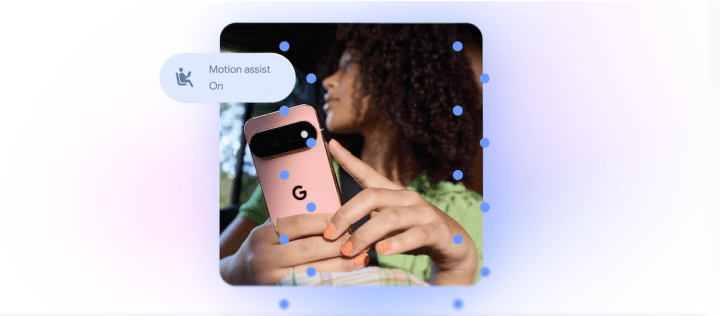
The Android motion sickness feature, known as Motion Assist, adds a bubble overlay to the screen that moves in response to the vehicle’s motion. This dynamic visual cue is designed to reduce the disconnect between what the eyes see on the screen and what the inner ear senses, which is the primary cause of motion sickness. When you’re reading or scrolling in a car, train, or bus, the visual input from the screen conflicts with the motion your body feels, leading to nausea and discomfort.
Motion Assist solves this by providing a stable reference point that moves with the vehicle. The bubble’s movement mimics the vehicle’s acceleration, braking, and turning, helping your brain reconcile the conflicting signals. Users can customize this Android motion sickness feature by setting it to turn on automatically, adding it to Quick Settings for easy access, and adjusting the bubble’s shape, color, and transparency to suit their preference.
While Google’s innovation is a significant step for Android users, the concept is not entirely new. Apple previously introduced a similar feature called “Vehicle Motion Cues” for iOS in 2024. That system uses animated dots around the edges of the display to achieve the same effect. However, Google’s implementation offers a customizable bubble and is available to Android 17 users, bringing a competitive edge to the platform.
Guided Vision: AI-Powered Accessibility
Beyond the Android motion sickness feature, Google is leveraging Gemini to create powerful tools for accessibility. One standout update is “Guided Vision,” a feature designed with blind and low-vision users in mind. By combining the phone’s camera with Gemini’s capabilities, this tool helps with everyday tasks that can be challenging for those with visual impairments.
Guided Vision can read small print on food labels, making nutrition information accessible. It can also help users view menus in dark restaurants by enhancing the camera’s image, or identify objects around the house that might be misplaced. The feature goes a step further by providing voice guidance when the camera isn’t positioned correctly. It will instruct users to move the phone, pan around, or center the object to capture the best view.
This intuitive assistance is rolling out to phones running Android 9 and newer in countries where Gemini is available, making it widely accessible. The integration of Gemini into accessibility tools demonstrates Google’s commitment to using AI for social good, ensuring that technology serves everyone regardless of their abilities.
Find Hub: Never Lose Important Items Again
Another update gives Gemini a new role as a personal assistant for remembering where you left important items. A new “remembered items” section in Find Hub will allow users to tell Gemini where they’ve stored something. For example, a user can say they put their passport in a bedroom drawer, and Gemini will save that information in Find Hub for later retrieval.
This feature goes beyond simple text notes. Users can also attach a photo to the saved item, making it easier to identify later. If you’re looking for your keys, you can search Find Hub and see the photo you took of them in their designated spot. This integration of AI with everyday organization could be a game-changer for forgetful users.
Google Messages Gets Smarter and More Personal
Google is also enhancing its messaging platform with two significant updates. First, a Google Keep integration is coming to Google Messages, enabling people to share and edit collaborative lists directly within a conversation. This makes planning trips, coordinating grocery shopping, or managing household tasks more seamless. Instead of switching between apps, users can create and update lists in real-time while chatting.
Second, Google Messages is getting more personalization options. Users will soon be able to customize individual chats with backgrounds, photos, and colors, with the text bubbles automatically matching the selected theme. This brings Google’s messaging app in line with Apple’s iMessage, which added a similar custom background feature last year. The ability to personalize conversations makes messaging feel more intimate and tailored to individual relationships.
A Summary of the Android Updates
| Feature | Description | Platform Availability |
|---|---|---|
| Motion Assist | A bubble overlay that moves with the vehicle to reduce motion sickness, representing the key Android motion sickness feature. | Android 17 |
| Guided Vision | Uses camera and Gemini to read text, identify objects, and provide voice guidance for blind and low-vision users. | Android 9+ (Gemini countries) |
| Find Hub Items | Allows users to tell Gemini where they’ve stored items for easy retrieval, with photo attachment support. | Android |
| Google Keep Integration | Share and edit collaborative lists directly in Google Messages conversations. | Google Messages |
| Customizable Messages | Personalize chats with custom backgrounds, photos, and matching text bubbles. | Google Messages |
The AI-First Strategy Behind These Updates
Many of these updates highlight Google’s growing reliance on Gemini to provide a more helpful and intelligent user experience. While some features, like the Android motion sickness feature and customizable message backgrounds, are Google’s response to existing Apple features, others like Guided Vision and Find Hub integration are truly innovative applications of AI.
Google is positioning itself as a leader in AI-driven mobile experiences. The company’s strategy appears to be twofold: matching competitors on essential features while pushing boundaries with Gemini-powered tools that offer unique value. This latest batch of updates makes a strong case for how Google is using AI to solve real-world problems, from physical discomfort to everyday forgetfulness.
What This Means for Android Users
For the average Android user, these updates represent a significant quality-of-life improvement. The Android motion sickness feature alone could transform how people use their phones during commutes or long road trips. Accessibility features like Guided Vision make the platform more inclusive, while organizational tools like Find Hub help users stay on top of their possessions.
The Google Messages updates also signal that Google is serious about competing with iMessage. By adding features that users have come to expect from premium messaging platforms, Google is making Android a more attractive option for users who value communication and personalization.
Google’s latest Android update delivers meaningful improvements across multiple areas, with the Android motion sickness feature standing out as a thoughtful solution to a common problem. Whether you’re a daily commuter, someone with visual impairments, or simply someone who wants more from their messaging app, these updates have something for everyone. As Google continues to integrate Gemini into more aspects of the Android experience, users can expect even smarter and more personalized features in the future.