
By using this site, you agree to the Privacy Policy and Terms of Use.
Accept
Techticia.comTechticia.comTechticia.com
  • Home
  • Recent
  • Jobs
  • Categories
    • News
    • AI
    • Apple
    • Gadgets
    • Startups
    • Wearables
  • Pages
    • Privacy Policy
    • About Us
    • Contact Us
    • Terms and Conditions
Search
Emerging Tech
  • Wearables
Business & Policy
  • Startups
Mobility & Culture
  • Contact
  • Blog
  • Privacy Policy
  • Terms of Use
© 2026 Techticia.com. All Rights Reserved.
Reading: Backglow MacBook App: Control the Glowing Apple Logo
Share
Sign In
Notification Show More
Font ResizerAa
Techticia.comTechticia.com
Font ResizerAa
Search
  • Home
  • Recent
  • Jobs
  • Categories
    • News
    • AI
    • Apple
    • Gadgets
    • Startups
    • Wearables
  • Pages
    • Privacy Policy
    • About Us
    • Contact Us
    • Terms and Conditions
Have an existing account? Sign In
Follow US
  • Contact
  • Blog
  • Privacy Policy
  • Terms of Use
© 2026 Techticia.com. All Rights Reserved.
Techticia.com > Blogs > Apple > Backglow MacBook App: Control the Glowing Apple Logo
AppleGadgets

Backglow MacBook App: Control the Glowing Apple Logo

Matilda Lucia, Techticia.com author avatar
Last updated: November 8, 2026 4:30 am
Matilda
Share
Backglow MacBook App: Control the Glowing Apple Logo
Credit: Apple
SHARE

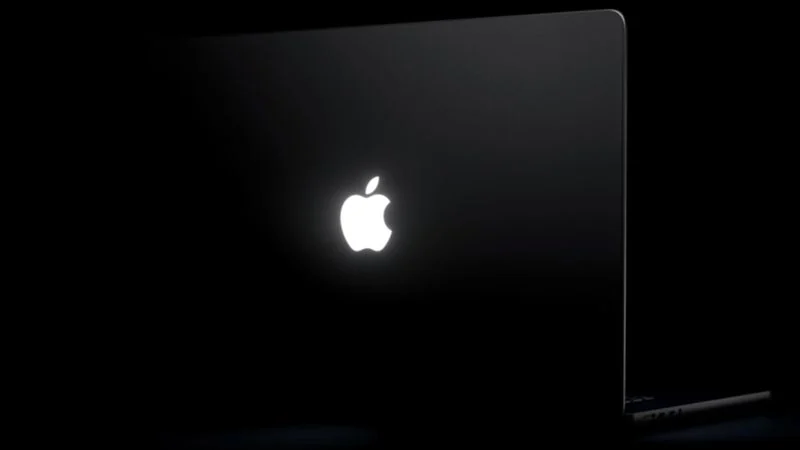
The glowing Apple logo has returned to the MacBook Pro, and the Backglow MacBook app lets you customize it. Created by designer Juan Buis, the Backglow MacBook app gives owners of the new 14-inch and 16-inch MacBook Pro models direct control over the illuminated logo on the lid.

Contents
  • What the Free Version Offers
  • Pro Version Adds Music and Agents Modes
  • How Apple Brought the Glow Back
  • Why the Glowing Logo Still Matters
  • A Small but Welcome Addition

The app arrives shortly after Apple reintroduced the glowing logo with its new MacBook Pro models featuring PROLED XDR displays, released on Friday. Apple had phased out the glowing logo on MacBooks beginning in 2015, making its return a notable moment for longtime fans of the design.

What the Free Version Offers

The free version of the Backglow MacBook app covers the essentials for anyone who wants more control over the logo light.

  • Manual brightness: Adjust the brightness level of the Apple logo independently of the MacBook Pro’s display brightness.

  • One-click off: Turn the logo light off entirely with a single click, rather than having to use Terminal.

  • Breathe mode: Make the logo’s light gently pulse, similar to the sleep indicator light on older MacBooks.

The Breathe mode will feel familiar to longtime Mac users. It recreates the slow, breathing glow that once signaled a sleeping MacBook, bringing back a small but memorable part of the Mac experience.

Pro Version Adds Music and Agents Modes

A one-time payment unlocks the Pro version of the Backglow MacBook app. It costs $9 for a limited time** and **$15 later.

The Pro version adds two additional modes:

  1. Music mode: The logo’s light moves to the beat of the music you play on your Mac.

  2. Agents mode: The light pulses while Claude Code is working and blinks when your attention is needed.

Buis summarized the feature set in a post on X: manually set logo brightness (which Apple doesn’t let you do), breathe slowly like the old Mac sleep light, pulse to your music, blink when Claude needs you, and turn the logo light off with one click.

How Apple Brought the Glow Back

On older MacBooks, the logo was illuminated by the display’s backlight. OLED displays do not have a backlight, so Apple needed a new method for the new models.

John Gruber was told that Apple engineered a “custom light source just to enable the logo to glow once again, without adding any additional thickness to the lid.” When asked why, an Apple representative reportedly said: “Because it’s awesome.”

By default, Apple says the logo is illuminated whenever the Mac is awake. It automatically brightens or dims based on the screen’s brightness level and your environment’s lighting conditions, which the computer detects with its ambient light sensor.

One limitation to keep in mind: Buis said the logo is lit by a white LED that does not change colors. So while you can adjust brightness and behavior, you won’t be changing the glow to a different hue.

Why the Glowing Logo Still Matters

The return of the glowing Apple logo is a purely aesthetic touch, but that doesn’t make it meaningless. As one commenter put it, it’s “a completely useless feature. But still very cool.”

The glow has long served a branding purpose, much like vehicle emblems that are functionally useless but visually distinctive. Its return also signals the kind of attention to small details that defined an earlier era of Apple design.

Some users have also asked whether the Backglow MacBook app can restore the breathing LED status indicator that appeared when older Apple laptops fell asleep, along with the battery level LEDs found in early MacBooks. That question speaks to how much these small lights meant to longtime users.

A Small but Welcome Addition

For MacBook Pro owners who missed the breathing sleep light, the Backglow MacBook app restores a small piece of that experience while adding a few playful new tricks on top. The free version covers the basics, and the Pro version leans into fun with music-reactive and agent-aware modes.

It may be a cosmetic feature at heart, but the Backglow MacBook app shows how much people care about the small details that make a Mac feel personal. The glowing logo is back, and now it can glow exactly the way you want.


Siri Spotify iOS 27: Play Music Without Saying “on Spotify”
ChatGPT Apple Messages Plugin: Send Texts via AI
iPhone 18 Pro Stuck at 256GB Storage, Price Jumps Expected
Bluesound Apple Music Support Arrives in Free BluOS Update
AirPods 5 Launch Expected as Early as Next Month

Sign Up for Our Daily Newsletter

Get the latest breaking news and updates delivered straight to your inbox.
By signing up, you agree to our Terms and Conditions and acknowledge the data practices in our Privacy Policy. You may unsubscribe at any time.
Share This Article
Facebook Copy Link Print
Share
Matilda Lucia, Techticia.com author avatar
ByMatilda
Follow:
At Techticia.com, I cover technology, gadgets, AI, product reviews and practical consumer tips, helping readers follow the tools and trends shaping the digital world.
Previous Article Sync Apple Music Across Devices: Easy Setup Guide Sync Apple Music Across Devices: Easy Setup Guide
Leave a Comment

Leave a Reply Cancel reply

Your email address will not be published. Required fields are marked *

Stay Connected

FacebookLike
XFollow
InstagramFollow
YoutubeSubscribe
WhatsAppFollow
LinkedInFollow
ThreadsFollow
BlueskyFollow

 banner							
 banner
Find your people. Find your next chapter.
Connect, explore jobs, and share what you love.
Get Semasocial

Latest News

Sync Apple Music Across Devices: Easy Setup Guide
Apple Apps
Halide iPhone Duo Update Brings Foldable Camera Features
Apple Gadgets
Qwen Model Upload: Cohere's Alibaba Test Explained
Qwen Model Upload: Cohere’s Alibaba Test Explained
AI
Win Enterprise Customers: Secrets From Databricks Co-Founder
Startups

You Might also Like

Meadow Minimalist Phone: Leave Your Smartphone at Home
GadgetsNews

Meadow Minimalist Phone: Leave Your Smartphone at Home

Matilda Lucia, Techticia.com author avatar
Matilda
9 Min Read
Apple TV 4K Now Vintage Ahead of New Model
AppleGadgets

Apple TV 4K Now Vintage Ahead of New Model

Matilda Lucia, Techticia.com author avatar
Matilda
7 Min Read

Withings Apple Health Sync Costs $100 a Year for New Users

Matilda Lucia, Techticia.com author avatar
Matilda
6 Min Read
//

Craving the latest tech news? Techticia delivers! Dive deep into insightful articles on everything from cutting-edge gadgets and AI advancements to reviews, consumer tips, and future tech trends. Techticia.com keeps you informed and connected to the ever-evolving world of technology.

Sign Up for Our Newsletter

Subscribe to our newsletter to get our newest articles instantly!

Techticia.comTechticia.com
Follow US
© 2026 Techticia.com. All Rights Reserved.
Stay Ahead with Techticia
Get the latest technology news, reviews, guides, and updates from Techticia delivered to your inbox.
By subscribing, you agree to our Privacy Policy. Unsubscribe at any time.
Welcome Back!

Sign in to your account

Username or Email Address
Password

Lost your password?